Application Flow Control Instructions
The application flow instructions direct the flow of a task in a conditional or unconditional manner.
WAIT Instruction
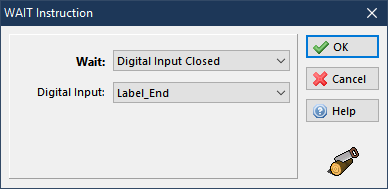
The WAIT instruction halts the current task, and the execution won't take place until the wait for condition is satisfied. It is possible to wait until:
-
Time delay elapses
-
The motor is running
-
The motor is at standstill
-
A Drive Digital Input is open
-
A Drive Digital Input is closed
TEST Instruction
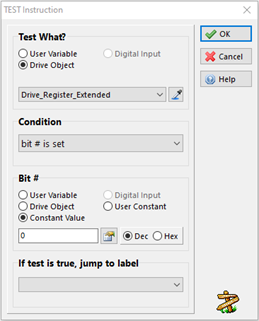
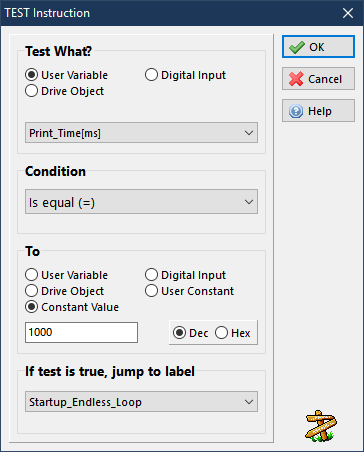
The TEST instruction performs a check on the current value of a User Variable, a Drive Object or a Digital Input. If the TEST condition is met, the execution of the current task will continue from the specified label, otherwise the execution will continue with the next instruction, just after the TEST instruction. It acts as an “if” statement. If the Test condition is met, the execution will jump to the specified label. If not, it will continue to the next line in the task.
When testing a digital input, note the only two values allowed are 0 (input open) or 1 (input closed). If the label name is not be defined when the TEST instruction is inserted in the application, leave the list box blank under the text “If test is true, jump to label”. You can edit this list box once a label name is defined.
If the If test is true, jump to label box is left blank when checking the application correctness, a 'label not found' error is issued. It is recommended to start every program with a TEST instruction line for drive object = Drive_Register_Extended with a Condition of “bit# is set”, “Bit# 0”. This allows time for the drive to initialize parameters and perform the RL_Motor_Detection if the bit is set to #1 within Working Settings. If the label name is not defined when the TEST instruction is inserted in the application, leave the list box blank under the text “If test is true, jump to label”. You can edit this list box once a label name is defined.
To define a label name for an instruction line, see "Editor Window".
JUMP Instruction
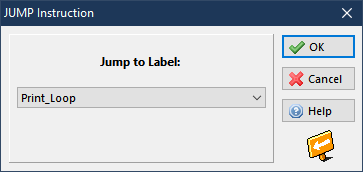
The JUMP instruction will change the execution flow f the current task only to the specified label.
If the label name is not defined prior to inserting the JUMP instruction in the application, leave the list box blank under Jump to Label. Edit this list box once a label name is defined. If the Jump to Label list box is left blank, the check function will issue a 'label not found' error (see Application Check Window).
To define a label name for an instruction line, see Editor Window.
CAL Instruction
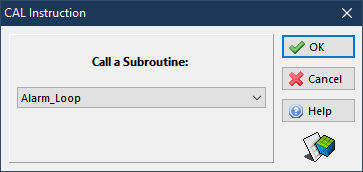
The CAL instruction changes the execution flow of the current task to the specified subroutine. The current task flow is restored when the RET instruction is executed inside the called subroutine.
If the label name is not defined when inserting the CAL instruction in the application, leave the list box blank under Call a Subroutine. Edit this list box once a Label Name has been defined.
If the Call a Subroutinelist box is left blank, the check function will issue a 'Label Not Found' error (see Application Check Window).
The subroutine can be defined outside the current task. To define a subroutine, just assign a label name to a valid instruction line (see Editor Window).
RET Instruction
The RET instruction (return instruction) will restore the execution of the current task only to the instruction immediately after the previously executed CAL instruction. Adding a RET instruction will not prompt a setting window because it doesn't require any arguments. If the RET instruction is executed by the drive without any previous CAL instruction, the drive will go in emergency condition and display a 'Too many RET' error in the Alarm History.


